
We Got Netflix at Home
Objective
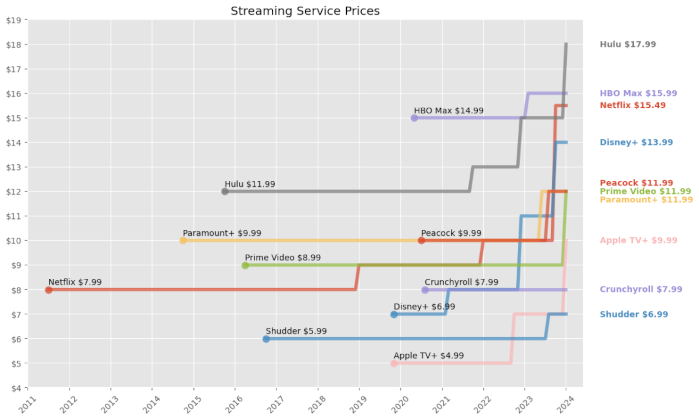
Your favorite actors have a contract, backstage is union, the nerds doing paperwork are on a salary. Just a thought. Hey wouldn’t it be nice to have a single place to watch your content? Backendy dive into automated(ish) home media server. This guide is for educational and informational purposes only. I will not condone or encourage the use of these tools for copyright infringement or piracy. The software mentioned is opensource and has many legitimate uses, such as managing personal media collections or public domain content. Y’all are responsible for ensuring your actions comply with all local and international copyright laws, got it? :)
Infrastructure Analysis
The brains here are going to be an Intel N5105 (NUC). Far from fancy, especially nowadays, but enough to handle a few streams. I’m keeping most stuff off device (and on the NAS)
and just mounting where needed. This keeps the NUC pretty statelessish. docker stuff and a cache dir are kept locally to help keep volume mounts simple and to make
sure I don’t doss myself during transcoding. Speaking of which, both of my gaming pcs are hooked up as transcoding nodes. Helpful lil web of devices.
1. The Glue
I’m trying to avoid broadcasting the entire setup to the world but crazily enough I do go outside and want some remote access. Network isolation is the first step.
I settled on gluetun as the vpn client strictly for qbittorrent. If the tunnel drops, the container loses connection. No leaks. For the frontend stuff like ombi and
plex I’m using cloudflare tunnels to punch out. It saves me from dealing with port forwarding and exposing my home to the entire internet. Plus a nice and clean domain
to bookmark.
2. The Stack
Pretty basic flow here. I want to take orders, look for, get, clean, and then serve content.
2.1 Take orders
- Ombi: Request portal
Nice enough mobile and web app. Easy to integrate with the stack and email notifications.
2.2 Look for
- Sonarr: TV
- Radarr: Movies
- Lidarr: Music
Bazarr:Subs, but I’m ignoring this setup hereKavita / LazyLibrarian:Books, but I’m ignoring this setup here
2.3 Get
- Prowlarr: Indexers
- Gluetun: VPN
- qBittorrent: Download (wrapped in
gluetun)
2.4 Clean
- Tdarr Server: NUC
- Tdarr Node(s): Gaming pcs
This setup scans the library and transcodes everything to h.265 to help saves space and bandwidth. It’s a “set it and forget it” queue that chews through the backlog.
2.5 Serve
- Plex: Netflix at home
jellyfin is pretty hot now. I bought the plex lifetime pass years ago and prefer the mindlessness of it.
3. The Storage
Before pulling images, I had to make sure the NUC can actually talk to the NAS without permissions errors ruining the vibe. I’m using nfs because I want the speed and (mostly) trust my local network.
3.1 The Mount
I added the NAS share to /etc/fstab to ensure it mounts on boot. If this fails, the docker stack essentially wakes up in a void.
ip:/Public /mnt/nas nfs defaults,auto,_netdev,nofail 0 04. The File
docker-compose.yml is doing the setup and mapping. It might look a lil scary but it’s just setting dirs and ports.
▶ This one's kinda long. Click to expand
services:  gluetun:    image: qmcgaw/gluetun    container_name: gluetun    cap_add:      - NET_ADMIN    devices:      - /dev/net/tun:/dev/net/tun    environment:      - VPN_SERVICE_PROVIDER=custom      - VPN_TYPE=wireguard      - FIREWALL_INPUT_PORTS=8080,6881    ports:      - 8080:8080      - 6881:6881      - 6881:6881/udp    volumes:      - ./gluetun:/gluetun    restart: always
  qbittorrent:    image: lscr.io/linuxserver/qbittorrent:latest    container_name: qbittorrent    network_mode: "service:gluetun"    environment:      - PUID=1000      - PGID=1000      - WEBUI_PORT=8080    volumes:      - ./qbittorrent:/config      - /mnt/nas/downloads:/downloads    restart: unless-stopped
  prowlarr:    image: lscr.io/linuxserver/prowlarr:latest    container_name: prowlarr    environment:      - PUID=1000      - PGID=1000    volumes:      - ./prowlarr:/config    ports:      - 9696:9696    restart: unless-stopped
  sonarr:    image: lscr.io/linuxserver/sonarr:latest    container_name: sonarr    environment:      - PUID=1000      - PGID=1000    volumes:      - ./sonarr:/config      - /mnt/nas/media/tv:/tv      - /mnt/nas/downloads:/downloads    ports:      - 8989:8989    restart: unless-stopped
  radarr:    image: lscr.io/linuxserver/radarr:latest    container_name: radarr    environment:      - PUID=1000      - PGID=1000    volumes:      - ./radarr:/config      - /mnt/nas/media/movies:/movies      - /mnt/nas/downloads:/downloads    ports:      - 7878:7878    restart: unless-stopped
  lidarr:    image: lscr.io/linuxserver/lidarr:latest    container_name: lidarr    environment:      - PUID=1000      - PGID=1000    volumes:      - ./lidarr:/config      - /mnt/nas/media/music:/music      - /mnt/nas/downloads:/downloads    ports:      - 8686:8686    restart: unless-stopped
  bazarr:    image: lscr.io/linuxserver/bazarr:latest    container_name: bazarr    environment:      - PUID=1000      - PGID=1000    volumes:      - ./bazarr:/config      - /mnt/nas/media/movies:/movies      - /mnt/nas/media/tv:/tv    ports:      - 6767:6767    restart: unless-stopped
  ombi:    image: lscr.io/linuxserver/ombi:latest    container_name: ombi    environment:      - PUID=1000      - PGID=1000      - BASE_URL=/ombi    volumes:      - ./ombi:/config    ports:      - 3579:3579    restart: unless-stopped
  tdarr:    image: ghcr.io/haveagitgat/tdarr:latest    container_name: tdarr    environment:      - TZ=America/Denver      - PUID=1000      - PGID=1000      - serverIP=0.0.0.0      - serverPort=8266      - webUIPort=8265      - internalNode=true    volumes:      - ./tdarr/server:/app/server      - ./tdarr/configs:/app/configs      - ./tdarr/logs:/app/logs      - /mnt/nas/media:/media      - /temp/transcode:/temp    ports:      - 8265:8265      - 8266:8266    restart: unless-stopped
  plex:    image: lscr.io/linuxserver/plex:latest    container_name: plex    network_mode: host    environment:      - PUID=1000      - PGID=1000      - VERSION=docker    volumes:      - ./plex:/config      - /mnt/nas/media:/media      - /temp/transcode:/transcode    restart: unless-stopped
Time to spin it up and pray:
docker-compose up -d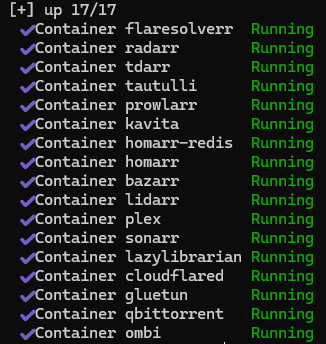
Mine are already created
If everything went right, you should see a bunch of “Creating…” messages. You could do a quick check with docker ps to make sure everything is actually running too
but green here is good enough for me.
5. The Hookup
It’s alive! Now to teach it what to do. Each service gets its own web ui and needs to be pointed to the right spot. (Here I’ll just hit some critical apps, it’s a LOT of the same movement)
5.1 Prowlarr
🌐@http://ip:9696
prowlarr is the centralized indexer manager. So instead of adding indexers to sonarr, radarr, lidarr, etc. individually, I configured them once here
and prowlarr syncs them everywhere.
Add Indexers

Get Connected
Now to see how cozy docker networking gets.
Settings → Apps → Add Application. I added Sonarr, Radarr, and Lidarr:
- Sonarr Server:
http://sonarr:8989 - Radarr Server:
http://radarr:7878 - Lidarr Server:
http://lidarr:8686
Can you guess what the prowlarr server entry would be? Grabbing the api keys for each app was a little annoying. Just a lot of hopping back and forth. Each one is in
Settings → General → Security → API Key but you need to nav to each app. Anyways with that plugged in prowlarr now syncs all my indexers to these apps automatically.

5.2 qBittorrent
🌐@http://ip:8080.
Default login is admin / adminadmin for reference, but you’re changing that right now ya? Went to Settings → Advanced → Network Interface and selected the VPN
interface (usually tun0) to ensures qbittorrent only uses the vpn tunnel.
I set my download path to /downloads to match volume mount under Options → Downloads:
- Default Save Path:
/downloads/complete - Keep incomplete torrents in:
/downloads/incomplete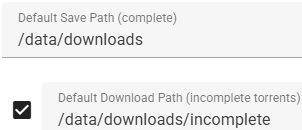
Fig.4 There's no way these visuals are helping
5.3 Sonarr, Radarr, Lidarr
🌐@http://ip:8989 for sonarr, :7878 for radarr, and :8686 for lidarr. These are nearly identical so I’ll cover them together.
Add Download Client
Settings → Download Clients → Add → qBittorrent:
- Host:
gluetun - Port:
8080 - Username/Password:
lol what if I just put that here - Category:
tvforsonarr,moviesforradarr,musicforlidarr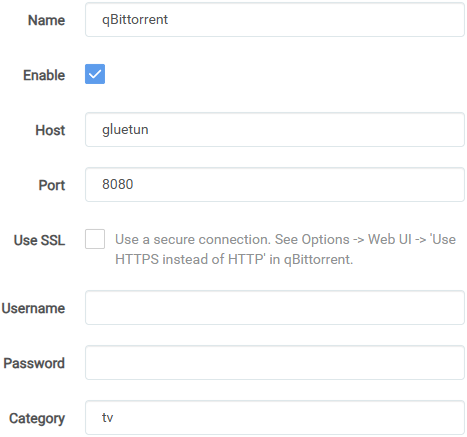
Fig.5 sonarr example, `tv` category. Obviously use your creds here too
Root Folders
Settings → Media Management → Add Root Folder:
- Sonarr:
/tv - Radarr:
/movies - Lidarr:
/music
Good lord, what a gross wall of text. Hopefully you see the basic connection flow though. Since this is in containers, I’m just throwing in the name instead of the full ip and using the mapped dirs instead of local rusty ones. Super condensed but for the entire flow I just threw the same content into every matching field across the full stack.
6. The Web
The NUC can transcode but it’s a bit slow. Plus it’s handling all this other stuff. My gaming pcs are just sitting there most of the day and can be put to work as some
tdarr transcoding nodes.
6.1 The Server
🌐@http://ip:8265.
Before adding nodes, some more mapping fun:
Libraries → Add Library:
- Source:
/media/tv(repeated for/animeand/movies) - Transcode cache:
/temp
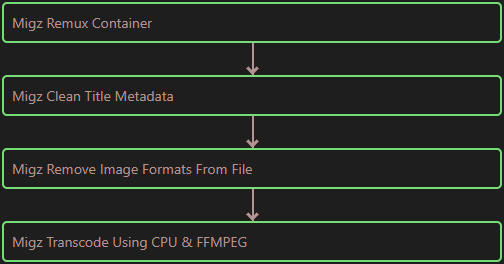
Mindless stack
Straighforward enough ya? I created a basic flow that targets vid files and transcodes to h.265. This is good enough for now, at least all files will end up in the same format.
6.2 The Nodes
Setting up the nodes is even more of the same. Only with the additional layer of mapping network drives in winblows. I chose Z: and Y:.
▶ This one's kinda long. Click to expand
{ "nodeName": "Adam", "serverURL": "http://ip:8266", "serverIP": "ip", "serverPort": "8266", "handbrakePath": "", "ffmpegPath": "", "mkvpropeditPath": "", "pathTranslators": [ { "server": "/media", "node": "Z:\\" }, { "server": "/tmp", "node": "Y:\\" } ], "nodeType": "mapped", "unmappedNodeCache": "C:/unmappedNodeCache", "logLevel": "INFO", "priority": -1, "cronPluginUpdate": "", "apiKey": "", "maxLogSizeMB": 10, "pollInterval": 2000, "startPaused": false, "auth": false, "authKey": "", "ccextractorPath": "", "maxTranscodes": 2, "workerTempDir": "C:\\tdarrcache", "workerTempDirUseRamDisk": false, "allowPlugins": true, "allowTranscode": true}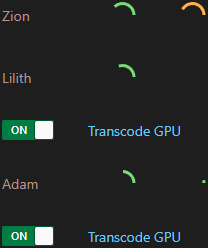
Amen
pathTranslates section is critical. The server sees /media, the winblows node needs to see \\IP\media (mapped as a network drive).
Same for the temp directory. With everything mapped all the nodes are visible and able to get to work!
7. End/Future
Pretty solid so far. The stack itself has been running fine for about a week now but there’s always room to mess around:
- Storage Expansion: 16tb is getting tight. Might add another drive or upgrade to larger capacities
- Better Monitoring: At the very least
homarrneeds some new css - Backup Strategy: Currently relying on hope. Should probably implement some automated backups