Reproducible Infrastructure Cross (architecture) Environment
Objective
To regain parity between linux systems. Starting, of course, with the most important aspect. Making things look pretty. Similar tools and aesthetic to build muscle memory on my gui devices. Plus who can hate on more (n)vim practice.
Infrastructure Analysis
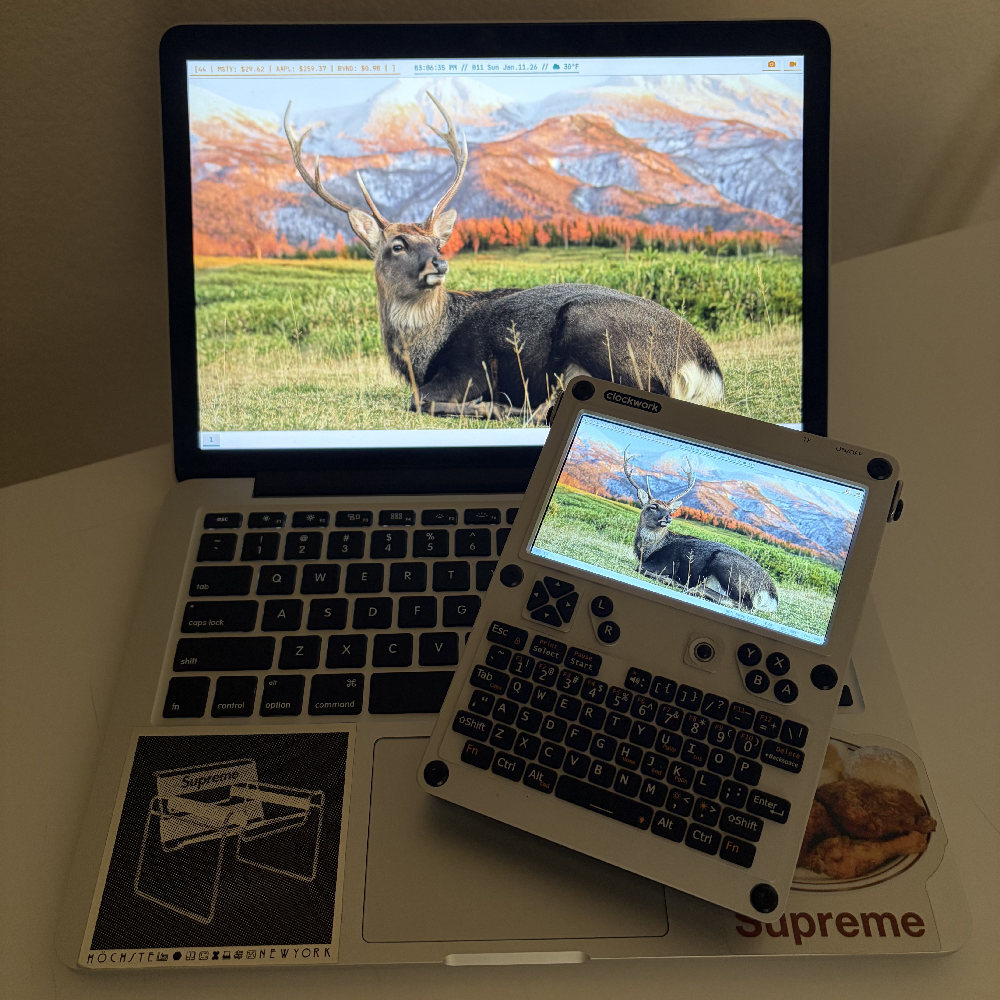
The suspects
The challenge lies in the hardware disparity. Bridging a high dpi laptop with a niche and constrained handheld terminal. Easy… right? Before starting, I knew keyboard stuff was going to be a pain. I was initially concerned because I only knew about the clockworkpi official images. Comprehensive. Good starting point but very bloated. Seems counterintuitive to borderline brick your rpi devices right out the gate. But they slap a ton of modules on there, I get it. Iirc I cheaped out and got the weaker chips which doesn’t help.
1. We’ve got a flasher!
I settled on debian 13 for the foundation. Seemed like the best balance of support and slimness for both devices. I picked up a custom trixie build for the cm4 here . And just used a stock build for the macbook. Time for everyone’s favorite disk destroyer!
sudo dd if=/path/to/image.iso of=/dev/sdXOr trust someone else with the plenty of gui tools available. The target for the cm4 is going to be the sd card that will live in the device. For the macbook, just a spare usb. A bunch of dialogs and “next” buttons later, I’m in.
2. Ricing
The term originated as a loaner from automotive culture. Specifically the import scene. Specifically specifically those classic
honda civics. The massive spoilers, underglow, all the stuff that would be expensive in nfs carbon. The idea of all bark
no bite. Form over function. Hours spent to look cool just to drive ten minutes to get groceries. Nerds are nerds and
that idea floated to computer land. Stock is lame, slap some custom themes on that thing. Need to have realtime cpu load
reporting as I check emails and update this site. Anyways, I decided to start with the easier of the two and focused on
the macbook first. Then setting that as the base with chezmoi.
2.1 The Installs
i3 will be missed. Very neat what can be run on a toaster. Anything with real pixels though? I found myself wrestling way
less with the screen and touchpad in wayland. Plus I get to keep my keybindings! Since I grabbed a stock min install, no
need to scrub gnome off the drive. A clean slate. Which also means empty. Starting with some off the dome basics:
- The wm:
sway - The wallpaper:
swaybg - The term:
foot(wayland native and fast enough for me) ← you really want to download a terminal - The launcher:
fuzzel(⌘+space is so engrained. More wayland native) - The browser:
brave
#let's assume i'm updatedsudo apt install sway swaybg xwayland foot fuzzel bravemkdir -p ~/.config/swaycp /etc/sway/config ~/.config/sway/configThis is for the initial group of apps I’ll be using this time around, a spot to throw some configs, and a copy of the system
default sway config in user space. No login manager, that’s bloat. But typing sway every time we boot is very annoying.
Time to hijack the shell profile. (Gotta make this stuff sound cool) Since this is debian I’m using .bash_profile.
if [ -z $DISPLAY ] && [ "$(tty)" = "/dev/tty1" ]; then exec swayfiBefore committing to the first reboot, from previous experience I know I want my main mod key and text size set. ⌘ is
going to be star today for sure. sway supports including config files which I’m using to keep the core config clean
while loading device specific overrides easily.
mkdir -p ~/.config/sway/host-specificAnd the first file:
#boring hostname#keyboard layout: ⌘ is Mod4set $mod Mod4The macbook screen pixel density is pretty pretty prettttty high. Default sway will treat it like 1080p making the term
text a struggle to read. Just telling sway to scale up before loading in to avoid having to squint at the config file
later. I plan on staying single(screen) so using a lazy blanket rule to scale.
#load host specific config (hostname is filename)include ~/.config/sway/host-specific/$(hostname)#scalingoutput * scale 2Pray and sudo reboot.
2.2 The Configs

Millennial hill I’ll die on: gifs are fun
Logging in after a simple and painless reboot to a plain grey screen and a cursor. Perfect. Time to slap a coat of paint on those apps from earlier. I’m not going to go into super deep detail about why I made every design decision. The rice (and this following writeup) has been enough of a time sink already. I settled on a light theme this time around. I don’t need my eyes. Settled on catppuccin latte for testing. I thought I was being smart by using different style files since I know apps might expect different inputs for colors, but it’s going to be a pain to change in the future. Personal hobby tech debt is crazy. Anyways, “catppuccin” and “latte” named files got baked in and are just references to that color palette. Fast forward to me thinking things look neat.
fastfetch (aesthetics and info)
▶ This one's kinda long. Click to expand
{ "$schema": "[https://github.com/fastfetch-cli/fastfetch/raw/dev/doc/json_schema.json](https://github.com/fastfetch-cli/fastfetch/raw/dev/doc/json_schema.json)", "logo": { "source": "~/.config/ascii/ff.txt", "type": "file", "color": { "1": "cyan" } }, "display": { "separator": " \u001b[33m▶\u001b[0m " }, "modules": [{ "type": "custom", "format": "┌───────────────────────────────────────┐", "outputColor": "yellow" }, { "type": "custom", "format": "│ 선장 탑승을 환영합니다 │", "outputColor": "yellow" }, { "type": "custom", "format": "└───────────────────────────────────────┘", "outputColor": "yellow" }, { "type": "custom", "format": "┌───────── Hardware Information ─────────┐", "outputColor": "blue" }, { "type": "cpu", "key": " cpu", "keyColor": "blue", "showPeCoreCount": false, "format": "{1}" }, { "type": "memory", "key": " ram", "keyColor": "blue", "format": "{1} / {2} ({3})" }, { "type": "custom", "format": "├───────── Software Information ─────────┤", "outputColor": "cyan" }, { "type": "os", "key": " dis", "keyColor": "cyan", "format": "{2} {8}" }, { "type": "kernel", "key": " krn", "keyColor": "cyan", "format": "{2}" }, { "type": "shell", "key": " shl", "keyColor": "cyan" }, { "type": "packages", "key": " apt", "keyColor": "cyan" }, { "type": "break" }, { "type": "uptime", "key": " upt", "keyColor": "green" }, { "type": "cpuusage", "key": " lod", "keyColor": "green", "format": "{1}" }, { "type": "disk", "key": " dsk", "keyColor": "green", "folders": [ "/" ], "format": "{1} / {2} ({3})" }, { "type": "custom", "format": "└───────────────────────────────────────┘", "outputColor": "green" }, "colors"]}foot (term)
[main]font=JetBrains Mono:size=11pad=8x8dpi-aware=yesinclude=~/.config/foot/themes/catppuccin-latte.inifuzzel (launcher)
[main]font=JetBrains Mono:size=12terminal=footlayer=overlaywidth=40lines=10inner-pad=10include=~/.config/fuzzel/catppuccin-latte.inimako (notif)
background-color=#eff1f5text-color=#4c4f69border-color=#7287fdborder-size=2border-radius=0padding=12margin=12default-timeout=5000font=JetBrains Mono 11nvim (editor)
▶ This one's kinda long. Click to expand
vim.g.mapleader = " "vim.opt.number = truevim.opt.relativenumber = truevim.opt.termguicolors = truevim.opt.confirm = truevim.opt.clipboard = "unnamedplus"local lazypath = vim.fn.stdpath("data") .. "/lazy/lazy.nvim"if not (vim.uv or vim.loop).fs_stat(lazypath) then vim.fn.system({ "git", "clone", "--filter=blob:none", "[https://github.com/folke/lazy.nvim.git](https://github.com/folke/lazy.nvim.git)", "--branch=stable", lazypath, })endvim.opt.rtp:prepend(lazypath)require("lazy").setup({{ "catppuccin/nvim", name = "catppuccin", priority = 1000, config = function() require("catppuccin").setup({ flavour = "latte", integrations = { alpha = true, cmp = true, treesitter = true }, }) vim.cmd.colorscheme("catppuccin") end,},{ "goolord/alpha-nvim", config = function() local dashboard = require("alpha.themes.dashboard") local header_path = vim.fn.expand("~/.config/ascii/nv.txt") if vim.fn.filereadable(header_path) == 1 then dashboard.section.header.val = vim.fn.readfile(header_path) else dashboard.section.header.val = { "no ascii" } end dashboard.section.buttons.val = { dashboard.button("e", " new", ":ene <BAR> startinsert <CR>"), dashboard.button("f", " find", ":Telescope find_files <CR>"), dashboard.button("q", " quit", ":qa<CR>"), } require("alpha").setup(dashboard.config) end,},{ "nvim-telescope/telescope.nvim", tag = "0.1.6", dependencies = { "nvim-lua/plenary.nvim" }, config = function() require("telescope").setup({ defaults = { file_ignore_patterns = { "Videos/", "Pictures/", "%.git/", "%.local/", "%.cache/", "%.mozilla/", "%.config/BraveSoftware/", }, }, pickers = { find_files = { hidden = true }, }, }) end,},{ "nvim-treesitter/nvim-treesitter", build = ":TSUpdate", config = function() require("nvim-treesitter.configs").setup({ ensure_installed = { "c", "lua", "vim", "vimdoc", "query", "bash", "html", "javascript" }, highlight = { enable = true }, }) end,},})yazi (files)
▶ This one's kinda long. Click to expand
[manager]cwd = { fg = "#179299" }hovered = { fg = "#eff1f5", bg = "#8839ef" }preview_hovered = { underline = true }find_keyword = { fg = "#df8e1d", italic = true }find_position = { fg = "#179299", bg = "reset", italic = true }border_style = { fg = "#4c4f69" }
[status]separator_open = ""separator_close = ""separator_style = { fg = "#4c4f69", bg = "#4c4f69" }mode_normal = { fg = "#eff1f5", bg = "#8839ef", bold = true }mode_select = { fg = "#eff1f5", bg = "#df8e1d", bold = true }mode_unset = { fg = "#eff1f5", bg = "#1e66f5", bold = true }
[filetype]rules = [ { mime = "image/*", fg = "#179299" }, { mime = "video/*", fg = "#ea76cb" }, { mime = "audio/*", fg = "#df8e1d" }, { mime = "application/zip", fg = "#ea76cb" }, { name = "*", fg = "#4c4f69" }]zk (notes)
[notebook]dir = "~/Notes"[note]language = "en"default-title = "Untitled"filename = "{{id}}-{{slug title}}"extension = "md"[tool]editor = "nvim"fzf-preview = "bat -p --color=always {-1}"[alias]n = "zk new --title ''"e = "zk edit --interactive"2.3 This guy’s got bars!


I think waybar took the longest to setup by far this time. Definitely hit feature creep hard and had to split
the initial single bar in two. Even without caring about constant system monitoring. Lots to look at I guess. I definitely
didn’t want to get too deep in state stuff either. Overall things came out looking pretty neat. Up top1
I have things a bit left loaded the bar with my ticker tracker marquee. I’m not a huge finance bro but enjoy some casual
gambling. Decided to split the info get and scroll visual into separate scripts just to make things easy. I don’t need to
spam the finnhub api and deal with throttling. Sorry, you’ll have to get your
own token.
URLS=()NAMES=()for ITEM in "${ASSETS[@]}"; do NAMES+=("${ITEM%%:*}") URLS+=("https://finnhub.io/api/v1/quote?symbol=${ITEM#*:}&token=$TOKEN")donePRICES=($(curl -s "${URLS[@]}" | jq -r '.c // 0'))OUTPUT=""for (( i=0; i<${#NAMES[@]}; i++ )); do VAL=$(printf "%.2f" "${PRICES[$i]}") SEP="${OUTPUT:+ | }" OUTPUT="${OUTPUT}${SEP}${NAMES[$i]}: \$$VAL"doneecho "$OUTPUT"DIR="$(cd "$(dirname "${BASH_SOURCE[0]}")" && pwd)"CMD="$DIR/gettick.sh"exec zscroll --length 50 \ --delay 0.42 \ --scroll-padding " | " \ --update-check true \ --update-interval 60 \ "$CMD"I settled on zscroll mostly just so I didn’t have to think about it myself. Simple enough args to throw in. My weather
script is pretty basic. Just a curl to wttr.in . I do a cache to
help visuals on device sleep/wake and map some conditions to icons.
▶ This one's kinda long. Click to expand
CACHE="$HOME/.cache/weather_status"DATA=$(curl -s --connect-timeout 2 "")if [[ "$DATA" == *"|"* ]]; then echo "$DATA" > "$CACHE"elif [[ -f "$CACHE" ]]; then DATA=$(<"$CACHE")else DATA="Unknown|--°F"fiCOND="${DATA%|*}"TEMP="${DATA#*|}"TEMP="${TEMP//+/}"case "$COND" in*Sunny*|*Clear*) ICON="" ;;*Partly*|*Cloudy*|*Overcast*) ICON="" ;;*Rain*|*Showers*|*Mist*) ICON="" ;;*Snow*|*Blizzard*) ICON="" ;;*Thunder*|*Lightning*) ICON="" ;;*Fog*|*Haze*) ICON="" ;;*) ICON="" ;;esacprintf "%s %s\n" "$ICON" "$TEMP"Wrapping the top bar up with a couple screenshot and recoder scripts. Just some wrappers and automation for grim and
wf-recorder respectively. Both actually in my sway dir as they were originally triggered with key combo mapping.
FILENAME="$HOME/Pictures/Screenshots/Screenshot_$(date +'%Y-%m-%d_%H%M%S').png"grim -g "$(slurp)" - | tee "$FILENAME" | wl-copyPIDFILE="/tmp/wayland_recording.pid"if [ -f "$PIDFILE" ]; then kill -INT $(cat "$PIDFILE") rm "$PIDFILE" LAST_VIDEO=$(ls -t ~/Videos/Screenshots/*.mp4 | head -n1) echo -n "$LAST_VIDEO" | wl-copyelse mkdir -p ~/Videos/Screenshots FILENAME="$HOME/Videos/Screenshots/Recording_$(date +'%Y-%m-%d_%H%M%S').mp4" wf-recorder -g "$(slurp)" -f "$FILENAME" & echo $! > "$PIDFILE"fiThe bottom bar2 stayed pretty stock. In terms of modules anyways. Very nice coat of paint but nothing too crazy.
With all that done the main waybar config can finally get filled out.
waybar
▶ This one's kinda long. Click to expand
[ { "name": "topbar", "layer": "top", "position": "top", "height": 35, "spacing": 0, "modules-left": [ "custom/ticker" ], "modules-center": [ "clock", "custom/weather" ], "modules-right": [ "custom/screenshot", "custom/recorder" ], "custom/ticker": { "exec": "~/.config/waybar/scripts/scrolltick.sh", "format": "[{}]", "tail": true }, "clock": { "interval": 1, "format": "{:%I:%M:%S %p // %j %a %b.%d.%y} ", "tooltip-format": "<big>{:%Y %B}</big>\n<tt><small>{calendar}</small></tt>" }, "custom/weather": { "exec": "~/.config/waybar/scripts/getweather.sh", "interval": 600, "format": "// {}", "tooltip": false }, "custom/screenshot": { "format": "", "on-click": "~/.config/sway/scripts/screenshot.sh", "tooltip": true, "tooltip-format": "Screenshot (Click or Mod+S)" }, "custom/recorder": { "format": "", "return-type": "json", "interval": 1, "exec": "pgrep wf-recorder > /dev/null && echo '{\"class\":\"recording\",\"tooltip\":\"Recording... (Click to Stop)\"}' || echo '{\"class\":\"idle\",\"tooltip\":\"Start Recording (Click or Mod+Shift+S)\"}'", "on-click": "~/.config/sway/scripts/recorder.sh" } }, { "name": "bottombar", "layer": "top", "position": "bottom", "height": 35, "spacing": 4, "modules-left": [ "sway/workspaces" ], "modules-center": [], "modules-right": [ "network", "bluetooth", "pulseaudio", "battery" ], "sway/workspaces": { "disable-scroll": true, "format": "{name}" }, "network": { "format-wifi": "NET: {essid} ({signalStrength}%)", "format-ethernet": "ETH: {ipaddr}", "format-disconnected": "NET: OFF", "tooltip-format": "{ifname} via {gwaddr}" }, "bluetooth": { "format": " ON", "format-off": " OFF", "format-disabled": " OFF", "format-connected": " {device_alias}", "on-click": "foot -T 'Bluetooth TUI' bluetoothctl", "on-click-right": "~/.config/sway/scripts/bt-toggle.sh", "tooltip-format": "{controller_alias}\t{controller_address}\n\n{num_connections} connected" }, "pulseaudio": { "scroll-step": 5, "format": "VOL: {volume}%", "format-bluetooth": "VOL-BT: {volume}%", "format-muted": "VOL: MUTE", "on-click": "pavucontrol" }, "battery": { "bat": "BAT0", "states": { "warning": 38, "critical": 17 }, "format": "PWR: {capacity}%", "format-charging": "CHG: {capacity}%", "format-plugged": "PLG: {capacity}%" } }]3 Showcase
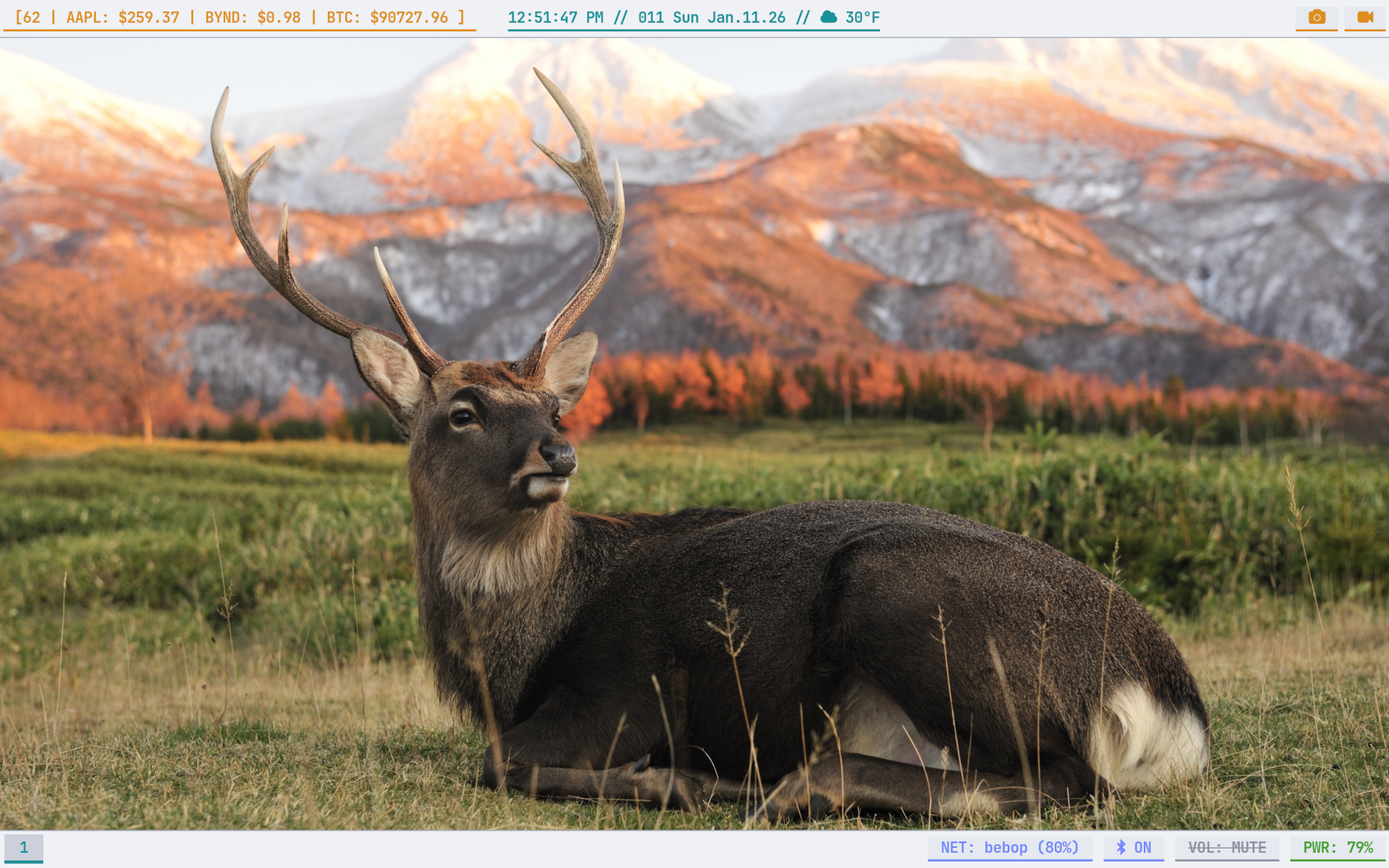
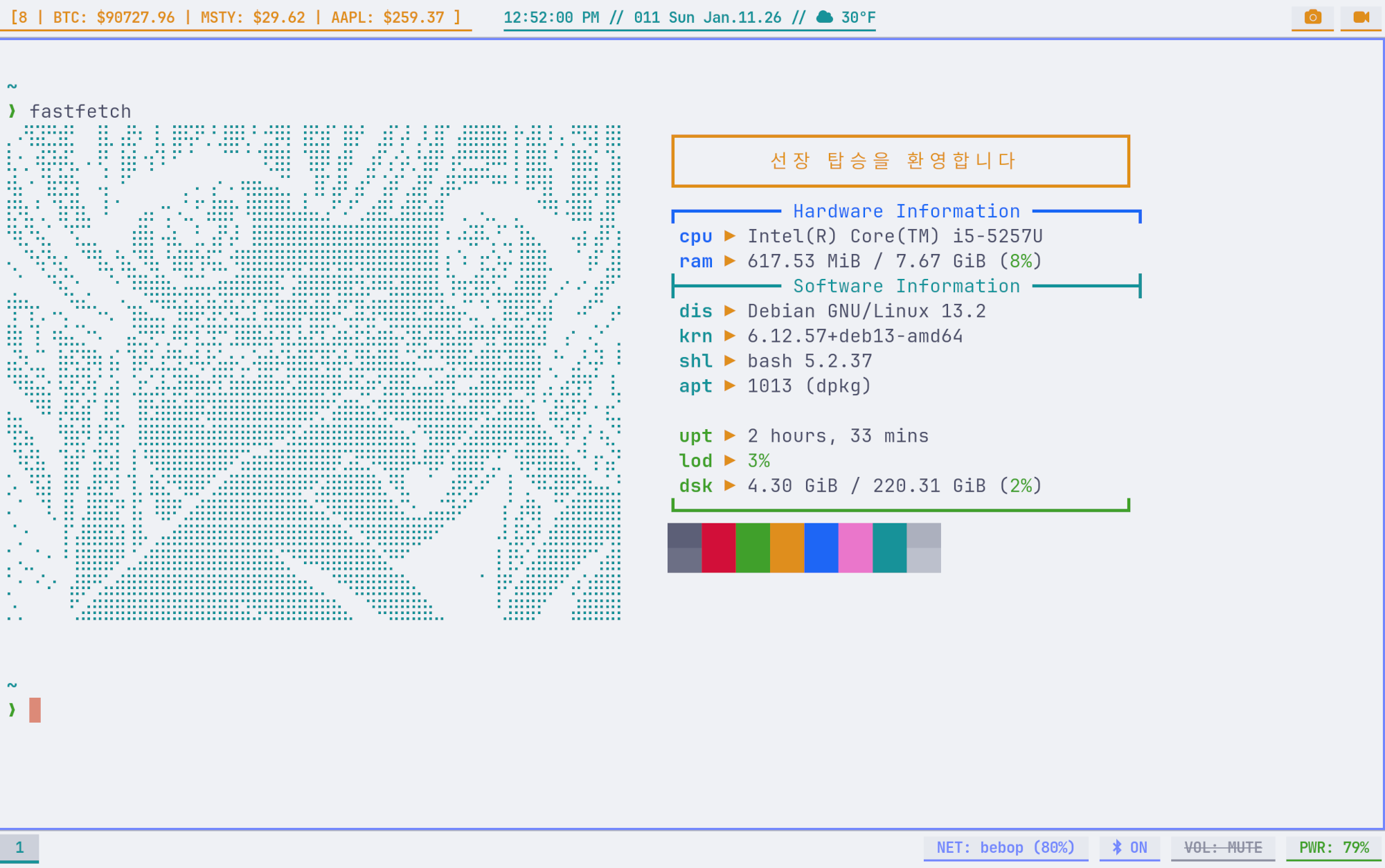
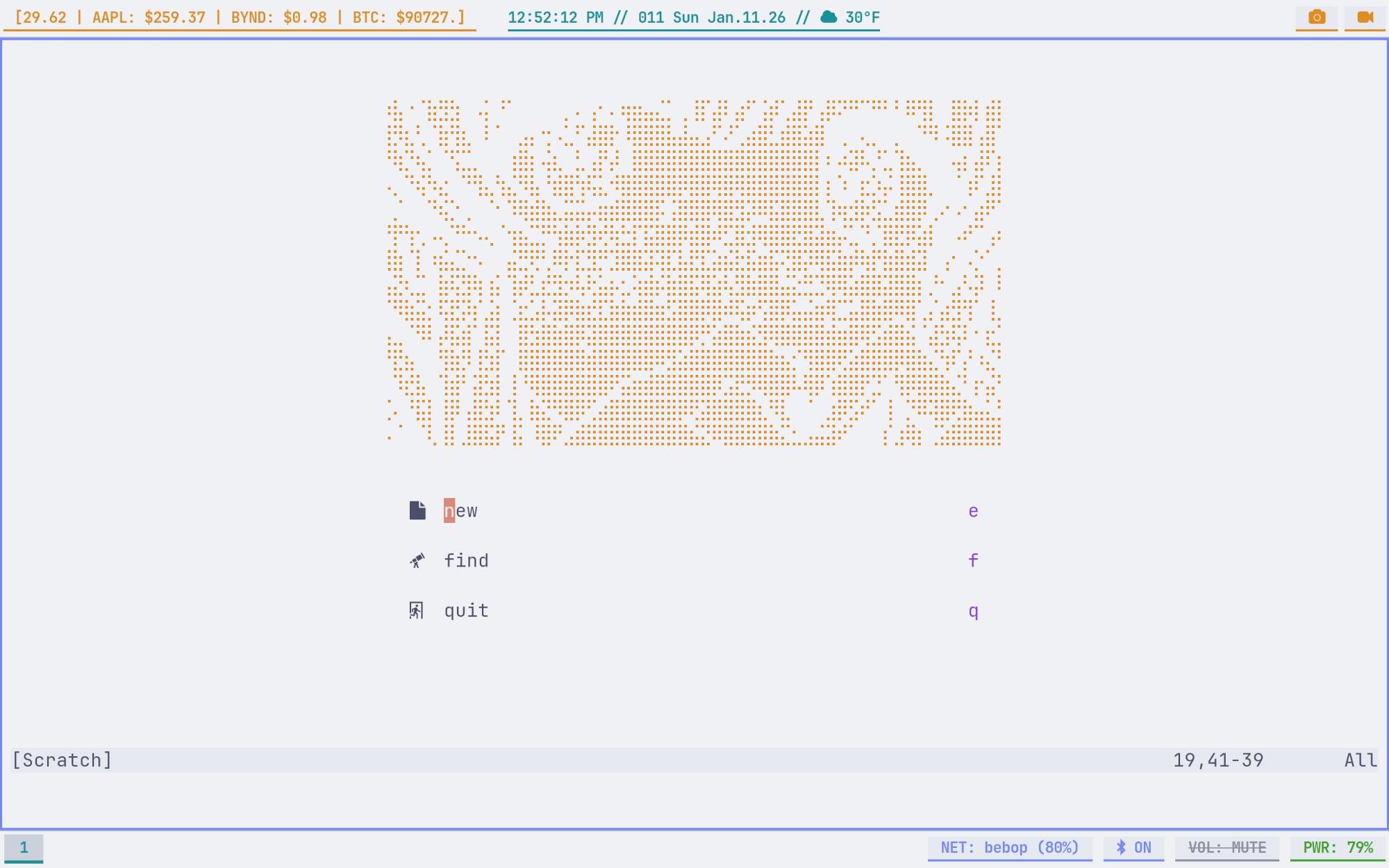
4. Synchronization Strategy
To maintain consistency without manual copying I deployed chezmoi. One of the benefits is the source state logic chezmoi
uses rather than simple symlinks. This allows for (more) templates! Things like battery module and super keys can be
configured differently per device while keeping the core config identical.
4.1 Directory Structure
I did a ton of other config stuff but for this part I’m only really concerned with foot, sway, and waybar config
stuff, organized as follows:
~├── .config/│ ├── foot/│ │ ├── themes/│ │ │ └── catppuccin-latte.ini│ │ └── foot.ini│ ├── sway/│ │ ├── conf.d/│ │ │ └── 20-latte.conf│ │ ├── scripts/│ │ │ ├── recorder.sh│ │ │ └── screenshot.sh│ │ └── config│ └── waybar/│ ├── scripts/│ │ ├── gettick.sh│ │ ├── getweather.sh│ │ └── scrolltick.sh│ ├── config│ ├── latte.css│ └── style.css├── .chezmoiignore└── .chezmoitemplates/chezmoi is basically git with more chars.
chezmoi add ~/.config/footchezmoi add ~/.config/swaychezmoi add ~/.config/waybarWith all that bundled in the chezmoi dir, it’s just a simple git push to get things locked in.
cd ~/.local/share/chezmoigit add .git commit -m "a super cool commit msg"git branch -M maingit push -u origin mainNow refreshes are a simple
chezmoi applyand transfers are a “simple”
chezmoi init --apply https://github.com/me/dotfiles.gitIf you’d rather skip all the rambling, here’s the repo.
5. Future
The current environment is stable on both devices for now. Phase 2 will focus on some server automation stuff:
- Key Combo Triggers: Press two buttons and
sshinto server and run basic update script for example - Refining
waybar: Less polling - Single Color Palette Definition: Less spaghetti